Tuning the Rob Run Aimbot: Bone, Smoothing and FOV
A Rob Run aimbot is easy to switch on and easy to get reported with. The default jump to the head looks fine from your side of the screen and obvious on the death cam of whoever you shot.
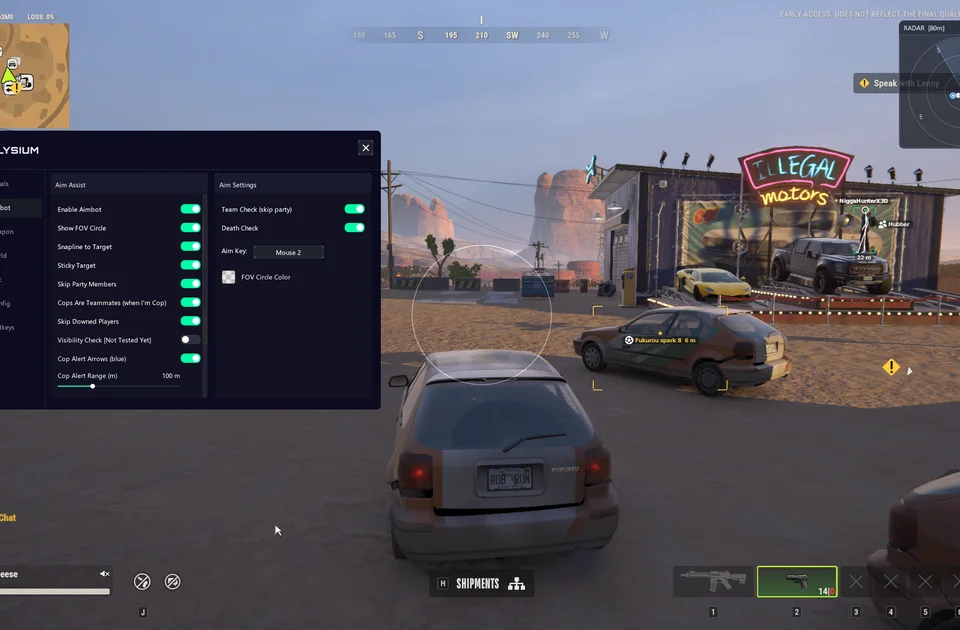
This guide covers every setting on the Aim Assist tab of our Rob Run cheat, what each one changes, and a starting profile that wins fights in the motel or on the street without screaming "cheater".
How the aimbot moves your crosshair
While you hold the aim key, the aimbot picks the best target inside the FOV circle and moves your mouse toward the chosen bone. It sends normal mouse input and never writes to game memory.
That is also why it is not silent aim. Silent aim bends bullets without moving the camera, and it needs code running inside the game, which an external tool does not have. Your crosshair visibly travels to the target, so how fast it travels decides how natural it looks.
Target bone
You can lock onto Head, Neck, Chest, Pelvis or the closest bone.
| Bone | When to use it | How it looks to others |
|---|---|---|
| Head | Short fights, armored targets | Suspicious if every kill is a headshot |
| Neck | Balanced damage | Reads as a slightly high chest shot |
| Chest | Default for most sessions | Most natural |
| Pelvis | Moving targets, cover peeks | Low and unremarkable |
| Closest | Fast close-quarters fights | Varies, can snap between bones |
Chest is the safe default for spray fights. Switch to neck when you want quicker kills without a perfect headshot ratio.
Smoothing
Think of smoothing as the brake on your crosshair. Low values snap; high values glide. A snap on a death cam is the fastest way to collect reports.
Start in the middle of the slider and raise it until the movement looks like a quick human flick. If you lose close fights because the crosshair arrives late, lower it one step at a time.
FOV circle
The FOV circle limits which players the aimbot will consider. A huge circle means the camera can swing 90 degrees to a target behind your shoulder, which is impossible to explain on a replay.
Keep it small, roughly the area you would naturally be looking at anyway. While tuning, show the circle on screen in any colour and switch on the snapline to see which player is locked. Hide the snapline once the numbers feel right.
Target priority and Sticky Target
Priority decides who gets picked when several players sit inside the circle:
- Crosshair: the one nearest your aim point. Most natural.
- Distance: the closest player. Good in a crowded store.
- Lowest HP: favours the weakest target the cheat can rank.
Sticky Target holds on to one person until they drop or step outside the circle. Without it, two robbers crossing paths can drag your aim back and forth. Turn it on for one-on-one chases.
Filters that keep you out of trouble
- Skip Downed Players: the knockdown state is read the instant you press the key, so a player who hit the floor a second ago is left alone.
- Skip party members and team check: never shoot your own crew.
- Cops Are Teammates: treats police as friendly when you play cop.
- Death check: ignores dead bodies.
- Visibility Check: tries to skip players behind cover. The menu labels it "Not Tested Yet", so do not trust it blindly.
- Max aim distance: defaults to 70 m. Leave it there. Locking onto someone across Looty Bay at 150 m with a pistol looks absurd.
Robbers will like Cop Alert Arrows: blue markers at the edge of your screen pointing toward any police officer within your chosen range. We cover that side in playing the robber role.
Prediction stays off
A Prediction option exists, but leave it off. Bullets in Rob Run land instantly, and the server rewinds for lag on its own. Leading the target makes the aimbot aim in front of them and miss.
Recoil and fire mode
The Weapon tab adds RCS, which pulls the mouse down while firing to cancel recoil, and Full Automatic for your own weapon. RCS pairs well with chest aim during longer sprays. Keep it moderate; perfectly flat sprays are as obvious as snapping.
A profile that looks human
- Bone: chest, or neck for quicker fights.
- Smoothing: mid to high, enough that the crosshair glides.
- FOV: small circle around your natural aim area.
- Priority: crosshair, Sticky Target on.
- Skip Downed, team check and party skip on.
- Max distance 70 m, prediction off.
- Release the aim key now and then and miss a few on purpose.
Run the aimbot alongside ESP so you only turn toward people you could plausibly have heard or spotted. Our wallhack layout keeps the screen clean, the full menu comparison shows the rest, and first-time users should follow the setup walkthrough.
Reports are the real risk
No setting makes an aimbot invisible. Players report what they see, and ban waves follow reports. Use a spare account, keep every slider dull, and read our honest take on bans.
Questions
Does the Rob Run aimbot have silent aim?
No. Silent aim needs code inside the game. This aimbot moves your mouse, so the camera visibly turns toward the target.
What is the best bone for the Rob Run aimbot?
Chest for most fights. Neck is a good middle ground when you want faster kills without an all-headshot record.
Should I turn on aimbot prediction?
No. Shots connect instantly and the server already corrects for ping, so leading a target just puts the crosshair in empty air.
Why is the aimbot range 70 m by default?
Most real fights happen inside that range, and locking onto distant players with short-range guns looks unnatural on a replay.
Will the aimbot shoot knocked-out players?
Not with Skip Downed Players on. It checks knockdown state at the moment you aim, so freshly downed players are ignored.